Reviewing an AI Product Image Before It Becomes a Sales Asset
Inspect a real gallery asset, separate useful composition from invented product details, and plan two prompt revisions without inventing benchmark results.
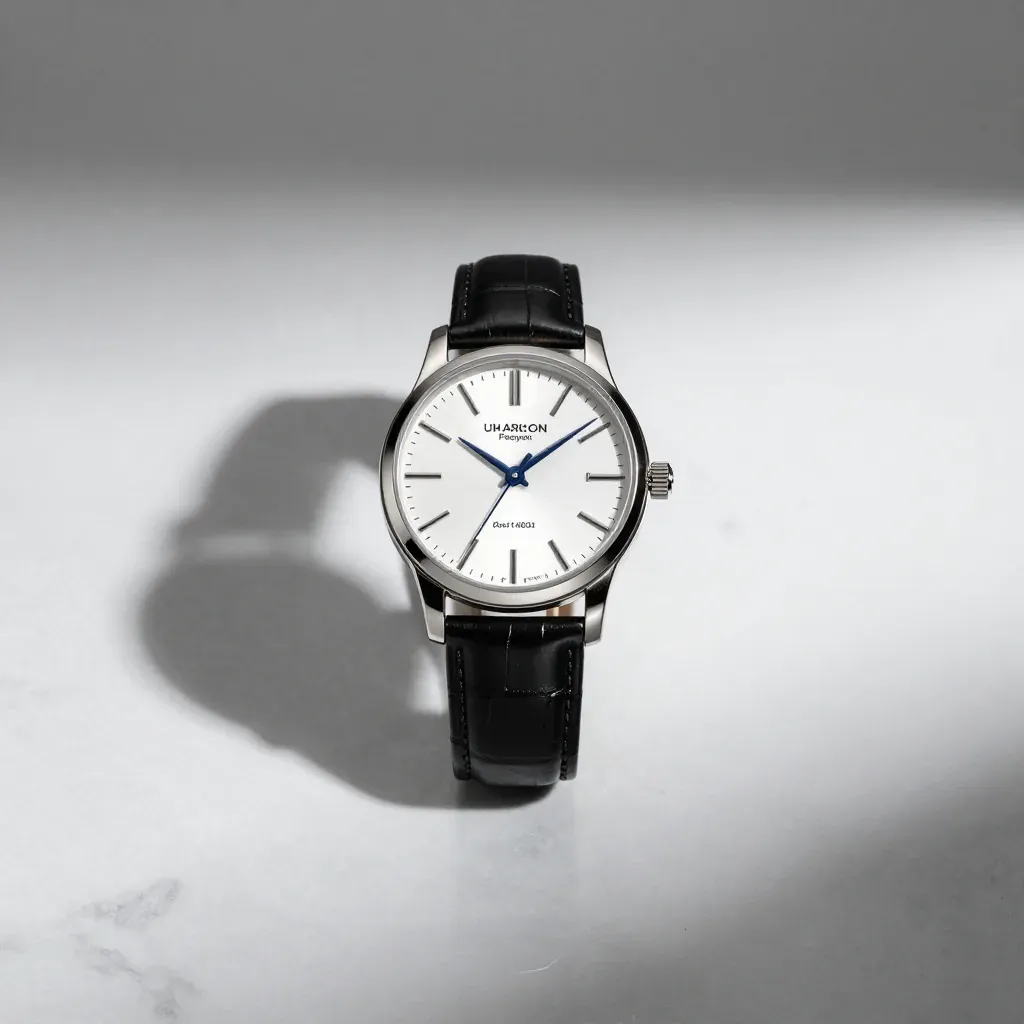
An attractive product-style image can still be a poor sales asset. A viewer may read generated lettering as a brand, interpret a fictional shape as an available product, or assume that a clean studio composition proves physical accuracy. This walkthrough uses the watch image already published in our example gallery to show how to separate composition review from product verification.
This is an editorial inspection of an existing asset, not a new generation experiment. The original run's seed, provider version, elapsed time, and full request log are not available here. The prompt below is the prompt associated with the gallery entry. Proposed revisions are exercises for a future run; we have not generated or measured their results in this article.
Start with the associated prompt and available facts
The gallery prompt reads:
Luxury watch on white marble surface, soft shadow, product photography, studio lighting, minimalist, high-end
The displayed file is a square 1024 × 1024 image. For a new attempt with the current free generator, select 1:1. The interface exposes the prompt and aspect ratio, not a user-selectable seed, sampler, or guidance scale. Do not add invented values for those settings to your notes. A rerun may differ even when the visible controls match.
Before generating anything, write a brief that can be evaluated: one fictional watch, an unobstructed silhouette, enough margin for a square crop, and no claim that the object is a real item for sale. If the actual task is selling an existing watch, this brief is insufficient. Use an authorized photograph of that watch and evaluate any edits against its physical details.
What the existing image does usefully
The watch is centrally placed, its dark strap separates from the pale background, and the case is easy to identify at a glance. There is space around the object, which helps a designer compare possible crops. The image communicates a product-photography direction without requiring a long caption. These are concrete composition observations about this asset.
The surface and lighting also provide a starting point for discussing tone. A pale setting keeps attention on the object, while the shadow gives it some visual grounding. Those choices may suit a fictional concept board. They do not establish a conversion benefit, lighting accuracy, or suitability for a particular marketplace; no such measurements were made.
Where the image fails a stricter brief
The lettering on the dial is irregular and cannot be treated as an approved product mark. Small marks near the lower dial also need inspection. A thumbnail can hide these defects, so review the original size before deciding that the image is ready. Enlarging the file cannot turn invented letters into verified branding.
The shadow is broad and dark compared with the prompt's request for a soft shadow. That is a mismatch worth recording even if someone prefers the resulting look. The lesson is to distinguish preference from instruction-following: a pleasing image can fail the brief, and a technically correct file can still be unsuitable for publication.
Revision exercise one: remove unnecessary typography
Try a more constrained fictional-object brief:
A fictional unbranded wristwatch with a plain face and simple hour markers, one watch centered on a pale neutral tabletop, full strap visible, no words or logo, square product concept photograph.
This proposed revision removes the ambiguous luxury-brand cue and explicitly describes the dial. Keep the 1:1 setting and compare the next output with the same acceptance criteria. The instruction does not guarantee that lettering will disappear. If symbols or marks remain, reject or manually correct the image rather than presenting the wording as a safety mechanism.
Record the outcome before changing another variable. Save the original request, returned file, and notes about lettering, silhouette, and margins. A second run with different wording is a comparison between two attempts, not proof that the revised phrase always works better.
Revision exercise two: specify the lighting relationship
For a separate experiment, focus on the shadow:
One fictional wristwatch centered on a pale neutral tabletop, large diffused light source above and to the right, light soft-edged shadow falling left, clear watch outline, neutral color, square studio concept image.
Judge the resulting shadow's edge, darkness, and direction separately. Avoid changing the camera angle, object materials, and background pattern at the same time, because that makes it harder to identify what changed. If the image remains dramatic, write that observation down. Do not label it a successful lighting correction merely because the prompt contains the intended terms.
For a real campaign, the acceptable shadow depends on the surrounding design. Evaluate the picture in the actual layout, including the background color and text contrast. A treatment that looks elegant by itself may become confusing when placed next to a call to action.
Use an acceptance record instead of an invented score
A useful record has a small number of explicit decisions: does the file open, are its dimensions correct, is there exactly one intended object, is generated text absent or corrected, and does the final crop preserve the shape? Add the intended publication context and the reason for keeping or rejecting the candidate.
Record technical failures separately from visual rejection. A timed-out request has no visible result to inspect. A completed request with distorted lettering is a delivered file that fails a particular content criterion. Combining the two into an unexplained percentage makes the result harder for another person to reproduce.
Prepare the final asset and explain its limits
Keep the original output before making corrections. Add approved typography in a design editor when needed, check the exported dimensions, and inspect the image at the size readers will actually see. Write alt text describing the object and composition, without inventing its manufacturer, materials, or specifications.
For a concept board, label the picture as an AI-generated fictional product concept. For an actual listing, use evidence tied to the real product and confirm that editing has not changed important details. Review our commercial-use and license FAQ before promising rights to a client, and use How we test as the structure for a future measured experiment.