Turning a Square AI Forest Image Into a Useful Blog Header
Review a gallery image, plan a landscape crop, protect text readability, and define honest acceptance criteria for an AI-generated editorial header.
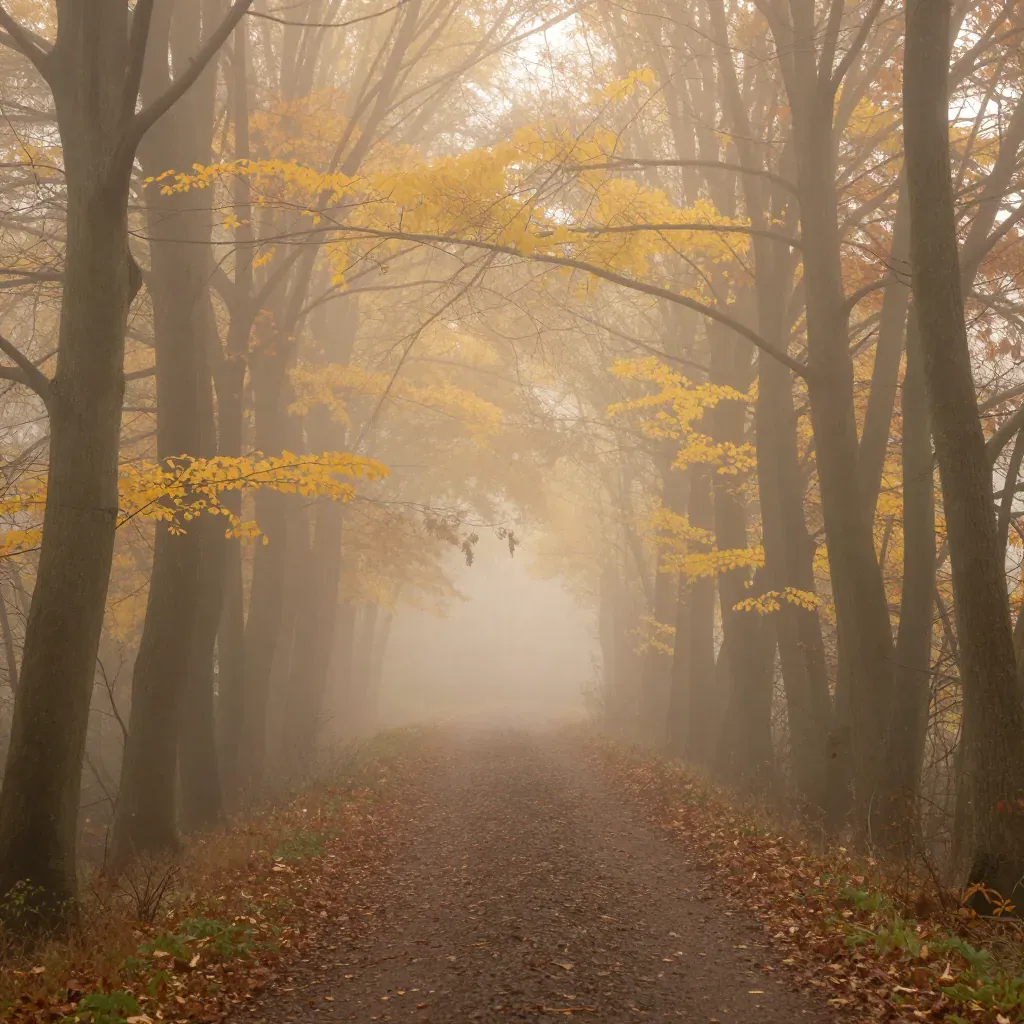
A square image that looks convincing in a gallery may not work in a wide article header. Cropping changes the relationship between the subject, empty space, and headline. This walkthrough inspects the existing misty-forest asset in our example gallery and develops a practical brief for an editorial illustration. It is intended for a fictional mood or topic image, not evidence that a particular place was photographed.
The observations below come from the displayed file. We have not run a new model comparison, generated the proposed variants, or measured performance. The gallery's associated prompt is available, but its original seed, provider version, and run log are not. That limits exact reproducibility and is why the exercises describe what to test rather than promise identical results.
Identify the source and its composition
The associated prompt is:
Misty forest path in autumn, golden light filtering through trees, fog, peaceful atmosphere, fine art photography
The source is 1024 × 1024. A path leads toward a bright, misty center. Dark tree trunks frame both sides, and warm leaves provide contrast against the haze. The center is the main visual destination. Those visible relationships matter more to the crop than generic phrases such as beautiful or cinematic.
For a reflective blog post, the image could introduce a mood of quiet or uncertainty. It cannot establish a named walking route, a travel destination, the date of an event, or an environmental condition at a real location. Decide whether your article needs an illustration or documentary evidence before choosing this kind of image.
Calculate a wide crop before changing the prompt
A 16:9 crop using the full 1024-pixel width is 576 pixels high. Cropping the square therefore removes 448 pixels of vertical content in total. A centered crop would remove 224 pixels from the top and 224 from the bottom. This is arithmetic for this source, not a recommendation issued by a publishing platform.
That crop preserves the central haze but removes some overhead branches and foreground path. Move the crop vertically and compare the alternatives in your own editor. A lower crop may retain more of the path's entrance; a higher crop may emphasize the light. Neither is automatically correct. The useful choice is the one that supports the article's purpose without cutting away the subject you want readers to notice.
Keep the headline separate from the busiest texture
Branches, leaves, and high-contrast tree edges compete with small lettering. Test the actual headline at the narrowest layout you intend to use. Do not judge readability using a short placeholder when the real title wraps to three lines. If the header fails on a phone, move the text outside the image or simplify the composition.
An overlay can improve contrast, but it also changes the illustration. Inspect the final treatment with the real font, weight, line spacing, and background. Keep important navigation and buttons separate from decorative imagery. A blog header should help the reader understand the article, not make the first paragraph or the next action harder to find.
Revision exercise one: ask for composition space
For a new landscape attempt, select the free generator's 16:9 option and try:
An autumn woodland path leading into soft morning mist, tree trunks framing the far left and right edges, a quiet open area in the upper center for a separate editorial headline, warm muted leaves, natural light, no text, landscape composition.
The requested size in the current interface is 1024 × 576. The prompt specifies intended space, while the aspect-ratio control determines the output shape. Words such as landscape do not replace selecting that control. Record both settings when comparing attempts.
This revision is untested here. If branches still cross the planned text area, document that mismatch and choose whether to revise, crop differently, or place the headline outside the image. Do not say that the prompt guarantees a clean typography area.
Revision exercise two: reduce competing visual emphasis
If the first candidate is too busy, change the density rather than adding more style adjectives:
A simple autumn forest path, a small number of clearly separated tree trunks at the edges, restrained foliage, soft mist toward the center, gentle warm light, an uncluttered editorial landscape, no people and no lettering.
Compare the number of dominant elements and the clarity of the path. Keep your intended crop and placement unchanged during the comparison. Otherwise a favorable new layout could conceal a worse underlying image. Review the result at full size and at the final display size; each reveals different problems.
These exercises do not establish a model ranking or a success rate. They make a brief testable by changing a defined compositional requirement and checking whether the next returned image meets it.
Check publication details that the preview cannot answer
Save the downloaded original and an optimized copy. Check dimensions after export, choose an appropriate image format, and confirm that the page reserves the correct aspect ratio so the text below it does not jump when the image loads. Avoid stretching the square source to fill a wide area; stretching changes the shape of the trees and the path.
Write an accessibility description that reflects the image's role. If it introduces the article's subject, a concise description of the autumn path and mist may help. If it is purely decorative and repeats information already supplied nearby, an empty alternative can be appropriate. Do not turn alt text into a list of search keywords or invent a real location.
Keep a short decision record
Record the source filename, the prompt associated with it, known dimensions, planned crop, final placement, and the reason you accepted the candidate. Mark missing generation settings as unavailable. Save unsuccessful candidates if you later publish a comparison, and distinguish visual inspection from measured experiments.
Before publication, review commercial-use limitations and the article's factual claims. Use the testing method for a new run and the aspect-ratio guide for other layouts. A useful header is a deliberate part of the page, with a defensible purpose and a crop that survives the actual reading experience.