Background Removal Tests: Products, Fur, and Transparent Glass
A practical background-removal guide built around three increasingly difficult subjects, with an honest review method for edges and transparency.
Background removal is not one uniform problem. A dark, opaque bottle against a light wall is much easier to separate than fine fur against a similar tone. Clear glass is harder again because the background is visible through the subject.
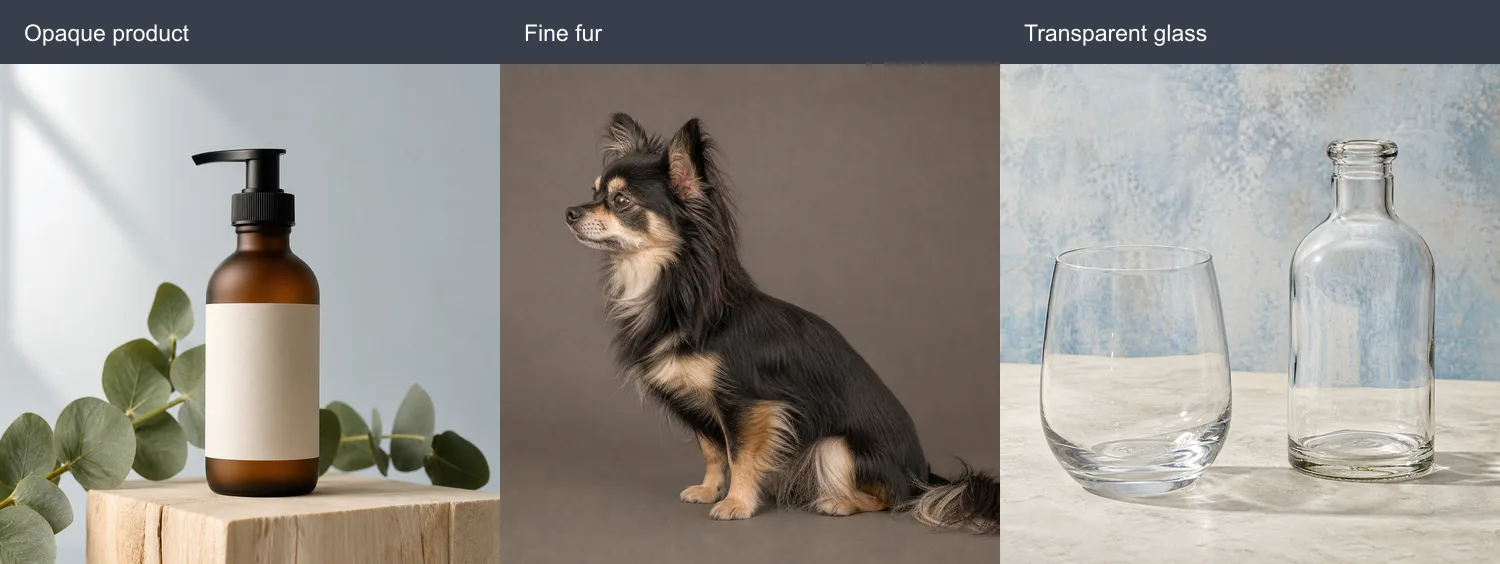
We prepared the three inputs below to make those differences concrete. They are test images, not evidence that every subject in a category will produce the same result.
Test 1: an opaque product with clear contrast
The amber bottle has a continuous silhouette, and most of it contrasts with the pale blue-gray background. This is a sensible first image for evaluating an automatic background remover.
Even here, “simple” does not mean automatic approval. Inspect the black pump, thin eucalyptus stems, the bottle’s warm translucent edges, and the contact area where the bottle meets the wood. Decide whether the wood and leaves belong to the subject before processing; an automatic model may make that decision differently.
Test 2: fine fur against a similar background
The dog includes isolated hairs around the ears, chest, legs, and tail. Some dark fur is close in value to the brown-gray backdrop. A mask can therefore be broadly correct while still looking clipped or smoky at full size.
Review the result on at least two backgrounds: white reveals dark halos, while a dark color reveals pale fringe and missing fur. Do not expect every individual hair to survive. For a small social graphic, a slightly simplified edge may be acceptable; for a large composite, refine the mask manually.
Test 3: transparent and reflective glass
The glass objects have visible outer edges, but their interiors contain the old background, refraction, highlights, and shadows. Removing only the area outside the silhouette does not create a believable transparent object on a new scene.
This is a case for manual masking or a compositing workflow that preserves partial transparency. Smoke, splashes, sheer fabric, and motion blur present related problems. A clean-looking thumbnail is not enough evidence—inspect the file over the final background at the final display size.
What happened in our July 18 test run
We submitted background-removal and 2× upscaling jobs while preparing this guide. The generator and photo editor returned files, but the later jobs were still pending after a three-minute observation window. We therefore do not show an “after” image or claim a successful edge result here. A queued request is not a quality test, and a source/after comparison should only be published once both files can be inspected.
That operational result also suggests a useful rule: keep your source file and do not build a deadline around an unverified processing time.
A repeatable review method
- Start with the original JPG, PNG, or WebP rather than a screenshot or repeatedly compressed copy.
- Decide what the subject includes before uploading: product only, product plus prop, or an entire grouped arrangement.
- Download the transparent PNG; do not judge only from a small preview.
- Place it over white, near-black, and the intended final background.
- Inspect hair, gaps between limbs, reflective edges, holes, and contact shadows at 100% zoom.
- Reject or manually refine the mask when the error is visible at delivery size.
Choose the right tool for the boundary
Use an automatic remover for a quick first mask when the main subject is opaque and visually distinct. Use a conventional editor when you need exact inclusion, partial transparency, a recoverable mask, or repeatable results across a product catalogue. Use the AI photo editor instead when you want to replace the scene rather than obtain a transparent file—but remember that a generated replacement may reinterpret the subject too.
The useful question is not “does AI remove backgrounds?” It is “is this edge good enough for this particular layout?” Test the downloaded file where it will be used, and keep manual masking available for the cases that genuinely need it.