
A Tested AI Product Image Workflow: Generate, Edit, Check, Then Export
A transparent product-image test showing the exact prompt, the visible edit, the checkpoints we used, and which queued steps we did not claim as complete.
Many “complete AI workflows” describe ideal steps without showing what actually happened. For this article we ran a small product-image test on July 18, 2026, saved the returned files, and separated completed outputs from queued requests.
The subject is fictional and unbranded. It is suitable for concept development, not for representing a real product’s packaging or contents.
The brief
We wanted a vertical editorial image of one amber pump bottle on pale wood, with a few eucalyptus leaves and a quiet sage-and-cream palette. The label had to remain blank so real, editable typography could be added later.
Step 1: generate one usable base
We selected ImageFree.net’s 3:4 ratio and used this prompt:
“Editorial product photograph of one fictional unbranded amber glass skincare pump bottle with a blank cream label, upright on a pale raw-wood block, a few eucalyptus leaves, muted sage and cream palette, soft window light from upper left, clean pale blue-gray studio background, no text, no logo, photorealistic.”
The returned image established the correct subject, palette, and vertical layout. It also contained a believable blank label instead of invented brand text, which made it a reasonable input for one focused edit.
Step 2: make one edit and compare the whole frame
We uploaded the generated file to the AI photo editor with:
“Reduce the saturation of the eucalyptus and add gentle directional window light from the upper left. Keep the bottle shape, blank label, wood block, framing, and background composition unchanged.”
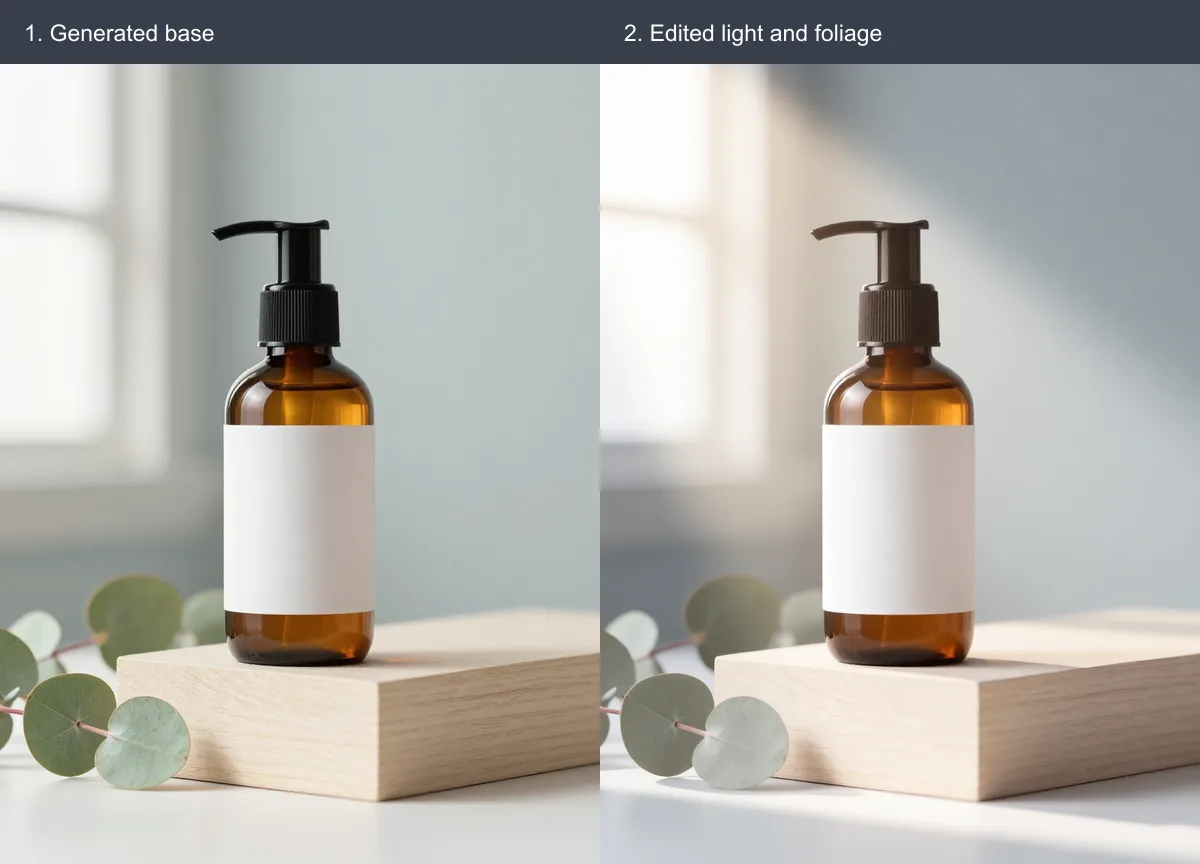
The edited file is not a local color adjustment. It is a fresh interpretation: the bottle became larger in frame, the window glow warmed, the wood block changed position, and the leaves moved. The requested mood improved, but “keep the composition unchanged” was not followed literally. That is the most useful lesson from the comparison.
For a real product, we would reject any version that changed package geometry, label content, or regulated information. Here the object was fictional and the blank label remained blank, so the variation was acceptable for a concept image.
Step 3: request a transparent variant—but wait for evidence
We submitted the edited file to the background remover. A transparent cut-out could be useful for a square layout, but the task was still pending after our three-minute observation window. We did not create a fake “after” panel or infer edge quality from the source.
When a result is available, the acceptance check is straightforward: place the PNG over white and near-black backgrounds; inspect the pump, translucent amber edge, leaf stems, and wood contact shadow at 100%; then decide whether the cut-out is usable or needs a manual mask.
Step 4: upscale only when the layout requires it
We also submitted the edited file to the 2× upscaler. That task remained pending within the same observation window, so we make no claim about sharpness or returned dimensions in this test.
Before upscaling, calculate the pixel size required by the actual layout. After a result returns, compare bottle edges, pump ridges, blank-label boundaries, leaf veins, and repeating wood texture at 100%. Enlarged dimensions do not guarantee more truthful detail.
The workflow is a series of acceptance gates
- Generate: keep a file only when composition and object geometry fit the brief.
- Edit: compare against the previous file, not just the written prompt.
- Remove background: inspect the downloaded alpha edge on contrasting colors.
- Upscale: verify dimensions and reject invented texture or halos.
- Export: add real typography in a layout tool and test the final crop and file weight in the page.
This run produced verified generator and editor outputs, plus two queued tasks that were not counted as results. That distinction matters. A useful workflow is not a promise that every request finishes on a fixed schedule; it is a record of what was requested, what returned, what visibly changed, and why a human accepted or rejected each file.